
The five building blocks of a great prompt ▶ Watch
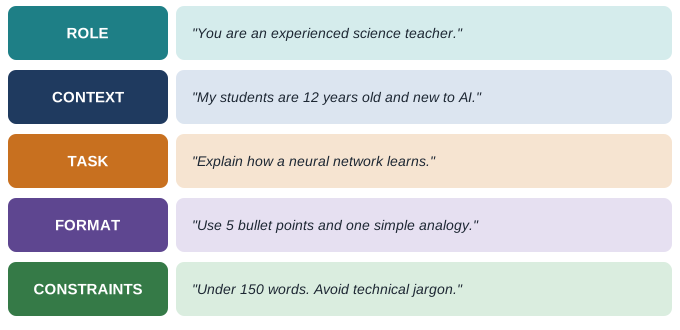
You do not need all five every time, but the more of them you include, the better and more predictable the answer.
Weak prompt versus strong prompt ▶ Watch
Proven prompting techniques ▶ Watch
| Technique | How to do it | Example |
|---|---|---|
| Be specific | State exactly what you want | "Summarise in 5 bullets for a 10-year-old" |
| Give context | Explain who, why and background | "This email is to an angry customer" |
| Assign a role | Tell it who to act as | "Act as an experienced math tutor" |
| Show examples (few-shot) | Give one to three samples of the output you want | "Here are two product descriptions I like..." |
| Ask for steps | Request step-by-step reasoning | "Work through this step by step" |
| Set the format | Table, list, JSON, email, code | "Answer as a table with 3 columns" |
| Add constraints | Length, tone, words to avoid | "Under 100 words, formal tone" |
| Iterate | Refine with follow-up messages | "Make it shorter and more persuasive" |
| Let AI ask | Ask it to question you first | "Ask me 5 questions before you start" |
Ready-to-use prompt templates ▶ Watch
STUDY:   Explain [topic] as if I am a beginner. Use an analogy,
         then give me 5 quiz questions with answers.

WRITING: Rewrite this [text] to be clearer and more [tone].
         Keep my meaning. Show the main changes.

PLANNING: Create a [7-day] plan to [goal]. I have [time]
         per day. Present it as a table.

CODING:  Write a [language] function that [does X].
         Add comments and 3 test cases.

RESEARCH: Give me the key arguments for and against [topic].
         Mark anything I should verify.
What you can use AI for every day ▶ Watch
- Learning - explanations at your level, practice questions, flashcards, language practice.
- Writing - drafts, emails, summaries, proofreading, translation.
- Work - meeting notes, reports, spreadsheet formulas, presentation outlines.
- Coding - writing, explaining and fixing code; learning new languages.
- Creativity - brainstorming names, stories, designs and marketing ideas.
- Life admin - trip planning, budgeting, recipes from what is in your fridge.
Do's and don'ts ▶ Watch
| Do | Don't |
|---|---|
| Verify facts, numbers and citations | Trust every answer blindly |
| Give context and examples | Expect it to read your mind |
| Iterate and refine | Give up after one weak answer |
| Remove personal and confidential data | Paste passwords, ID numbers or private client data |
| Use AI to learn and improve your own work | Submit AI work as your own where that is not allowed |
| Disclose AI use where required | Hide AI use from employers, teachers or publishers who require disclosure |
Chapter summary
- Good prompts include role, context, task, format and constraints.
- Techniques such as examples, step-by-step reasoning and iteration greatly improve results.
- AI helps with learning, writing, work, coding, creativity and daily planning.
- Always verify important facts and protect private information.