
Three ways to build with AI ▶ Watch
| Approach | Who it suits | Examples of tools |
|---|---|---|
| No-code automation | Non-programmers, quick workflows | Zapier, Make, n8n with AI steps |
| Low-code / AI app builders | Founders, makers, prototypes | Prompt-to-app builders, custom GPT-style assistants |
| Code with AI APIs | Developers, full control and scale | Claude API, OpenAI API, Gemini API, open-weight models |
The architecture of an AI application ▶ Watch
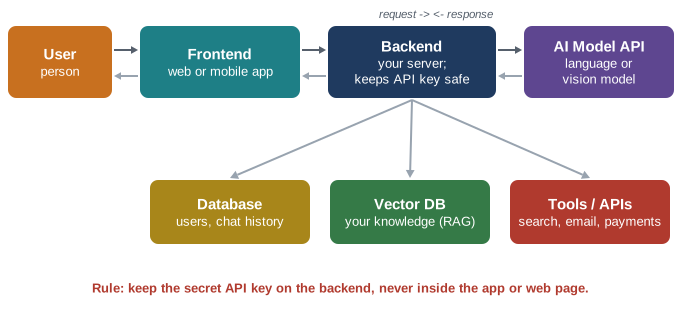
- The user types a question in your app.
- The frontend (web page or mobile app) sends it to your backend.
- The backend adds instructions (a system prompt), maybe relevant data, and calls the AI model API using a secret API key.
- The model returns an answer; the backend saves it if needed and sends it to the frontend.
- Optional extras: a database for users and history, a vector database for your own knowledge, and tools the AI can use.
Your first AI program (Python) ▶ Watch
Most AI providers offer an official software development kit (SDK). The pattern is almost identical everywhere: create a client, send a list of messages, read the reply. Here is an example using Anthropic's Python SDK. Install it with pip install anthropic and set your key in the ANTHROPIC_API_KEY environment variable.
import anthropic

client = anthropic.Anthropic()   # reads ANTHROPIC_API_KEY

reply = client.messages.create(
    model="claude-sonnet-5-5",   # check the docs for current names
    max_tokens=500,
    system="You are a friendly tutor for beginners.",
    messages=[
        {"role": "user",
         "content": "Explain photosynthesis in 3 sentences."}
    ],
)
print(reply.content[0].text)
The OpenAI and Gemini SDKs follow the same idea with slightly different function names. Because model names change often, always copy the current model identifier from the provider's documentation.
A simple backend for a web app (Flask) ▶ Watch
from flask import Flask, request, jsonify
import anthropic

app = Flask(__name__)
client = anthropic.Anthropic()

@app.post("/ask")
def ask():
    question = request.json["question"]
    reply = client.messages.create(
        model="claude-sonnet-5-5",
        max_tokens=600,
        system="You are a helpful study assistant.",
        messages=[{"role": "user", "content": question}],
    )
    return jsonify(answer=reply.content[0].text)
Teaching AI your own knowledge: RAG ▶ Watch
A general model does not know your company's policies, your course notes or yesterday's prices. Retrieval-Augmented Generation (RAG) solves this by finding the right information first and giving it to the model together with the question.
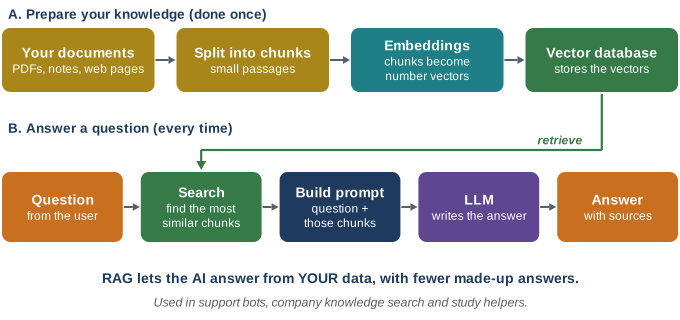
- Embeddings turn text into vectors so that passages with similar meaning are close together, even if they use different words.
- Vector databases (for example Pinecone, Chroma, Weaviate, or PostgreSQL with pgvector) search those vectors quickly.
- RAG is usually cheaper and easier to update than fine-tuning, and it lets the AI cite its sources.
AI agents and tool use ▶ Watch
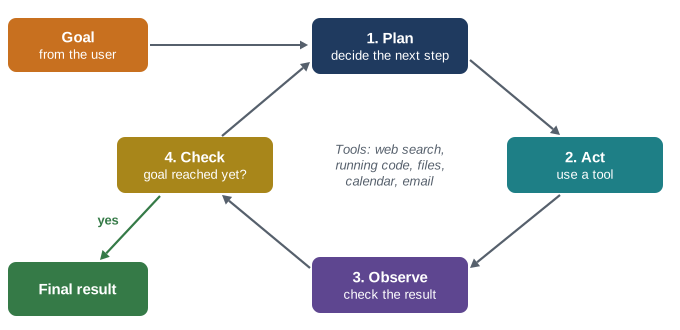
With tool use (also called function calling), you describe functions to the model - for example get_weather(city) or search_orders(email). The model decides when to call them, your code runs them, and the results go back to the model. An agent repeats this loop on its own until the task is done. The Model Context Protocol (MCP) is an open standard that makes it easier to connect AI apps to tools and data sources.
Popular frameworks ▶ Watch
- LangChain and LlamaIndex - building blocks for RAG, agents and pipelines.
- Vercel AI SDK - streaming chat interfaces for JavaScript web apps.
- Hugging Face - thousands of open models and datasets, plus libraries to run them.
- Official agent SDKs from AI providers for building tool-using agents.
Costs, speed and quality ▶ Watch
| Concern | Practical tip |
|---|---|
| Cost | APIs charge per input and output token; use smaller models for simple tasks and keep prompts lean. |
| Speed | Stream responses so users see text as it is generated; cache repeated prompts. |
| Quality | Write clear system prompts, test with real examples, and evaluate before launch. |
| Safety | Filter harmful input and output, limit what tools can do, and log activity. |
| Privacy | Tell users what is sent to AI providers and check each provider's data-use terms. |
Chapter summary
- Most AI apps connect to existing models via APIs rather than training new ones.
- Keep the API key on the backend; the frontend talks only to your server.
- RAG gives a model your own knowledge; tools and agents let it take actions.
- Manage cost, speed, quality, safety and privacy from day one.